Blog › TECH
Capcom ID Data Breach (11.77M Accounts): How to Tell If a "Your Data Was Leaked" Email Is Real, and What to Do Now (Oct 2026)
On October 22, Capcom made an announcement. Yes, that Capcom: Monster Hunter, Street Fighter, Resident Evil.
11,774,247 records from “CAPCOM ID” leaked to an outside party. That’s the worldwide total, not just Japan.
CAPCOM ID is the shared account you need for Capcom’s web services and some of its online games. If you play Capcom games anywhere in the world, you might have one.
And this is just one of many. Since September, Japan has seen new data breach announcements almost every day, enough that several government agencies issued warnings in the same week.
You can’t stop a breach. But you can stop what comes after it. And most of that comes down to one thing: what you do when the “your data was leaked” email shows up.
I went through the official Japanese announcements and put it all together here.
Information as of October 23, 2026.
Capcom breach: what leaked
Based on Capcom’s official announcement.
| Item | Details |
|---|---|
| Service | CAPCOM ID |
| Records leaked | 11,774,247 (worldwide total) |
| What leaked | Email address, account creation date/time, last login date/time, login count, IP address at last login |
| Extra data for some | 43 of those also had date of birth, gender, country/region, and nickname leaked |
| Passwords | No leak of user-set passwords confirmed. But 196 accounts had their password changed without permission (Capcom has already reset them) |
| Card data | Not included |
| Games | No impact on gameplay. CAPCOM ID still works |
Timeline: Capcom spotted signs of unauthorized access on October 19 and blocked it the same day. On October 20 it confirmed the leak. On October 21 it reported to the police and Japan’s Personal Information Protection Commission.
Why 196 passwords were changed when no passwords leaked: as of October 23, Capcom hasn’t said. It says it’s still investigating the full impact.
How will I know if I’m affected?
Capcom says it will contact affected users individually, in stages.
But in the same announcement, Capcom also warned:
Suspicious emails pretending to be from Capcom or related parties may be sent using the leaked information. Do not open URLs or attachments in such emails.
What leaked was, of all things, email addresses. So the inbox where Capcom’s real notice will land is also where fake “Capcom” emails will land.
Capcom’s announcement lists these contacts outside Japan:
- North, Central & South America / Europe, Middle East & Africa: Capcom Customer Support request form (EMEA can also use
feedback@capcom.com) - Asia (excluding Japan) & Oceania: Capcom Asia Customer Support,
info-asia@capcom.com
It’s not just Capcom: Japan, fall 2026
Dozens of breaches have been announced in Japan since late September. Here are the ones most likely to matter if you’ve traveled to or booked in Japan, based on each company’s own announcements.
| Service | Announced | Details |
|---|---|---|
| Capcom (CAPCOM ID) | Oct 22 | 11.77M worldwide. Email addresses etc. No card data |
| skyticket (Japanese flight & hotel booking) | Oct 9, Oct 16 | About 14.64M records: names, dates of birth, emails, phone numbers, addresses, passenger details. About 4.13M included passwords (hashed). In an Oct 16 update, it corrected itself: card data for up to 6,140 “skyticket Premium” users (payment logs from 2017–2018) was also involved |
The Japanese government stepped in too. On October 6, Japan’s Digital Minister made a direct appeal to the public at a press conference. From October 7 to 9, the Personal Information Protection Commission, the National Police Agency, the Financial Services Agency, and others all issued warnings. The government’s cybersecurity office collected them all on one page.
Got a breach email? How to check if it’s real
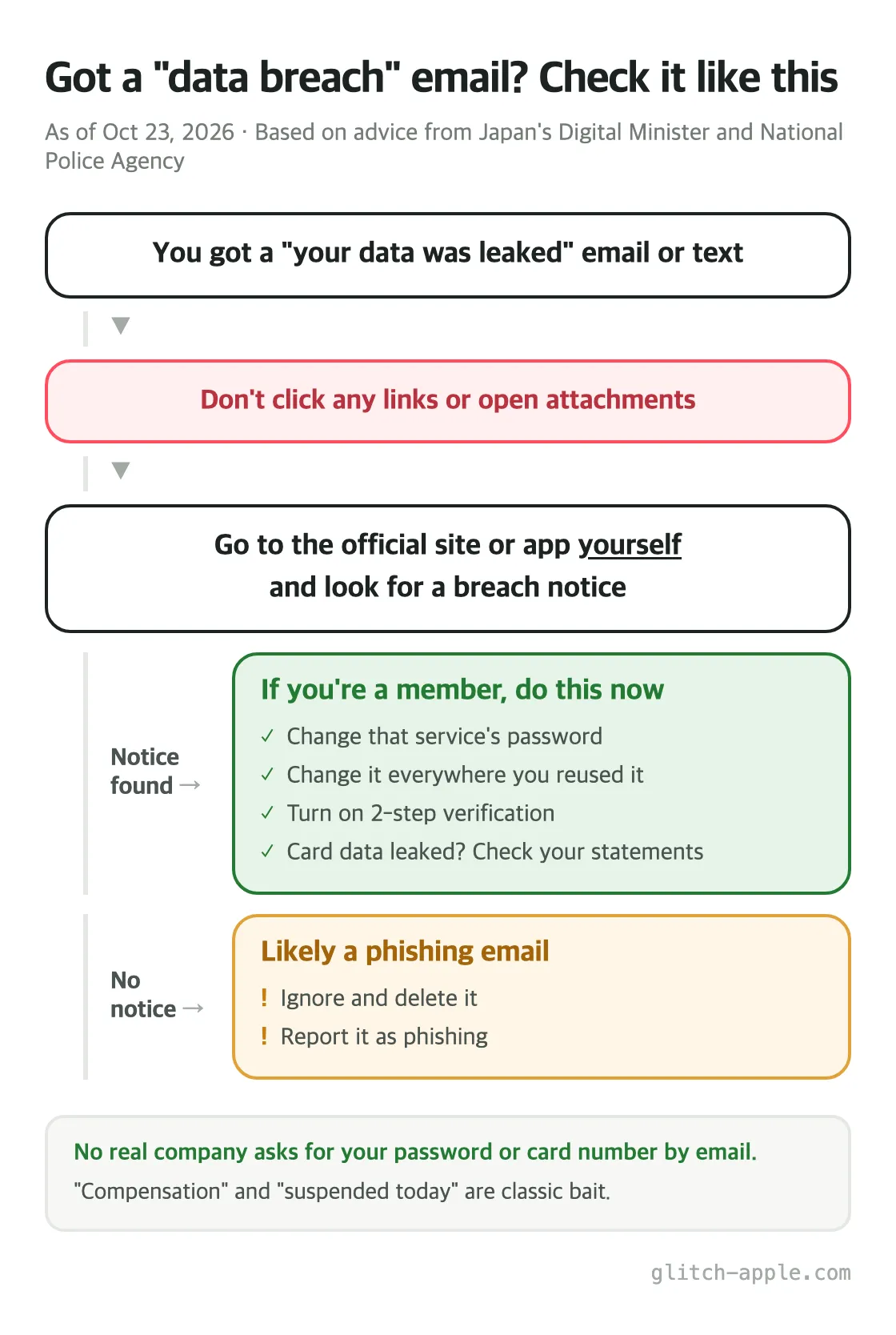
The key rule: don’t judge whether it’s real from inside the email.
Japan’s Digital Minister said exactly this at his October 6 press conference:
Please don’t casually open the links in messages. Always go through the official website or the official app.
Japan’s National Police Agency was just as specific in its October bulletin: the email “may be a fake pretending to be the company that leaked your data.”
Here’s the order:
- Don’t click links in the email or text. Don’t open attachments
- Go to the service yourself, through a bookmark or the official app
- Check whether there’s a breach notice on the official site. Big breaches are usually announced on the homepage or the news page
- Notice found, and you’re a member → go to “What to do now” below
- No notice → it’s most likely phishing. Ignore it
Emails that are almost certainly fake
- They ask you to enter your password, card number, or PIN. skyticket stated plainly that it will never ask for your password, card number, or PIN for refunds or compensation
- “We’ll pay you compensation” or “Claim your refund”, with a link to click
- “Act today or your account will be suspended”, rushing you
Sender addresses can be faked too. Don’t trust an email just because the “From” line looks right.

If you’re affected: what to do now
Japan’s Digital Minister and the National Police Agency both gave the same three pieces of advice. I’ve combined them with what the breached services said in their own notices.
1. Change that service’s password
Do it by going to the official site or app directly. Changing it through a link in the email defeats the point.
2. Change it everywhere you reused it ← most important
This is where the real danger is. Attackers take usernames and passwords leaked from one place and try them on other services. That’s exactly why the Digital Minister asked people to use a different password for each service: “If information leaks from one service, other services using the same password can be logged into without permission.”
If your Capcom password is the same as your Google, Apple, or PlayStation password, change those first.
Nobody can memorize a different password for every site. A browser password manager makes it easy. If your Chrome passwords aren’t syncing to your iPhone → Chrome Passwords Not Syncing to iPhone? Fix It With One Toggle

3. Turn on 2-step verification
Even if your password leaks, a second check by text or app at login can stop an attacker. The Digital Minister asked people to use it wherever it’s available. Turn it on for your email account first. If your email gets taken over, every other password can be reset through it.
4. If your card data leaked
As with skyticket, where card data was involved:
- Check your card statements for charges you don’t recognize (skyticket asked users to do this too)
- If you’re worried, call your card issuer and ask about a replacement card. Some cards also let you block overseas transactions
FAQ
I got an email from Capcom. Is it real?
Don’t check through the links in the email. Go to Capcom’s official site yourself and look for the notice. If you’re still unsure, contact Capcom support directly through the contacts above.
Only my email address leaked. Do I still need to do anything?
An email address alone can’t get your account hacked. But it does make you a target for phishing. Not clicking links is the most important thing. And it’s a good moment to stop reusing passwords, so the next breach hurts less.
I already clicked the link and entered my password
Change the password right away on every service that uses it. If you entered your card number too, call your card issuer immediately.
Summary
- Capcom: 11.77M CAPCOM ID records leaked worldwide (announced Oct 22). Email addresses etc., no card data. 196 accounts had passwords changed without permission
- Fall 2026 has brought breach after breach in Japan, including services travelers use, like skyticket
- Got a breach email? Don’t click. Go to the official site or app yourself and check
- What to do: change the password + change it everywhere you reused it + turn on 2-step verification
For more on security news from Japan, read The Night Japan Switched Off Over PHP2Shell.
Sources
This post is based on the following (checked October 23, 2026).
Official
- Capcom: Apology and notice regarding customer information leak due to unauthorized access (Japanese, PDF)
- Digital Agency of Japan: Digital Minister’s press conference, October 6, 2026 (Japanese)
- National Police Agency of Japan: Cyber Police Agency Letter 2026 Vol.19 “Beware of information leaks” (Japanese, PDF)
- National Cybersecurity Office of Japan: Warnings from each agency following data leaks by unauthorized access (Japanese)
- skyticket: Apology and notice regarding customer information leak (Japanese)
News
Comments